Microsoft Copilot Studio August 2026: Complete Guide to the Rebuilt Agent Platform, Workflow Designer, and Run-Only Sharing
On August 3, 2026, Microsoft quietly flipped a switch that most enterprise automation teams will feel for years: the new Workflow Designer inside Copilot Studio reached general availability. That same month, run-only agent sharing entered public preview, and the rebuilt orchestrator engine — already GA since July 7 — continued rolling out across tenants. Together, these changes transform Copilot Studio from a conversational bot builder into a full-stack agent orchestration platform.
- What Changed and Why It Matters
- The Rebuilt Orchestrator: Under the Hood
- Workflow Designer: GA as of August 3, 2026
- Computer-Using Agents in Workflows
- Run-Only Agent Sharing: Preview August 2026
- Skills: Reusable Markdown Instructions
- Entra Agent Identities: Preview
- The Simplified Build Surface: Nine Tabs to Four
- Microsoft IQ Integration: Agents That Know Your Organization
- What This Means for RPA Professionals
- 1. The Lines Between RPA and Agentic AI Are Dissolving
- 2. Skills Portability Reduces Vendor Lock-In
- 3. Governance Is Now a First-Class Concern
- Migration Path: What Existing Copilot Studio Users Should Do
- How Copilot Studio Compares to Other Agent Platforms
- Frequently Asked Questions
- Do I need to migrate my existing Copilot Studio agents to the new platform?
- Is the Copilot Studio Workflow Designer a replacement for Power Automate?
- Can I use Copilot Studio agents for desktop automation like RPA?
- What models does the rebuilt Copilot Studio support?
- When will run-only agent sharing be generally available?
- Key Takeaways
- References
If you build RPA workflows, design enterprise automations, or architect agentic AI systems, the August 2026 Copilot Studio updates deserve close attention. Microsoft is not just adding features — it has replaced the platform’s orchestration engine, authoring surface, and deployment model from the ground up. This guide covers every major change, what it means for practitioners, and how to plan your migration.
What Changed and Why It Matters
The previous Copilot Studio was built around a topic-based conversation model: you authored conversation paths, conditions, and branching logic. That model works for scripted FAQ bots. It breaks when agents need to execute multi-step workflows, call other agents, or dynamically adapt a plan across a long horizon.
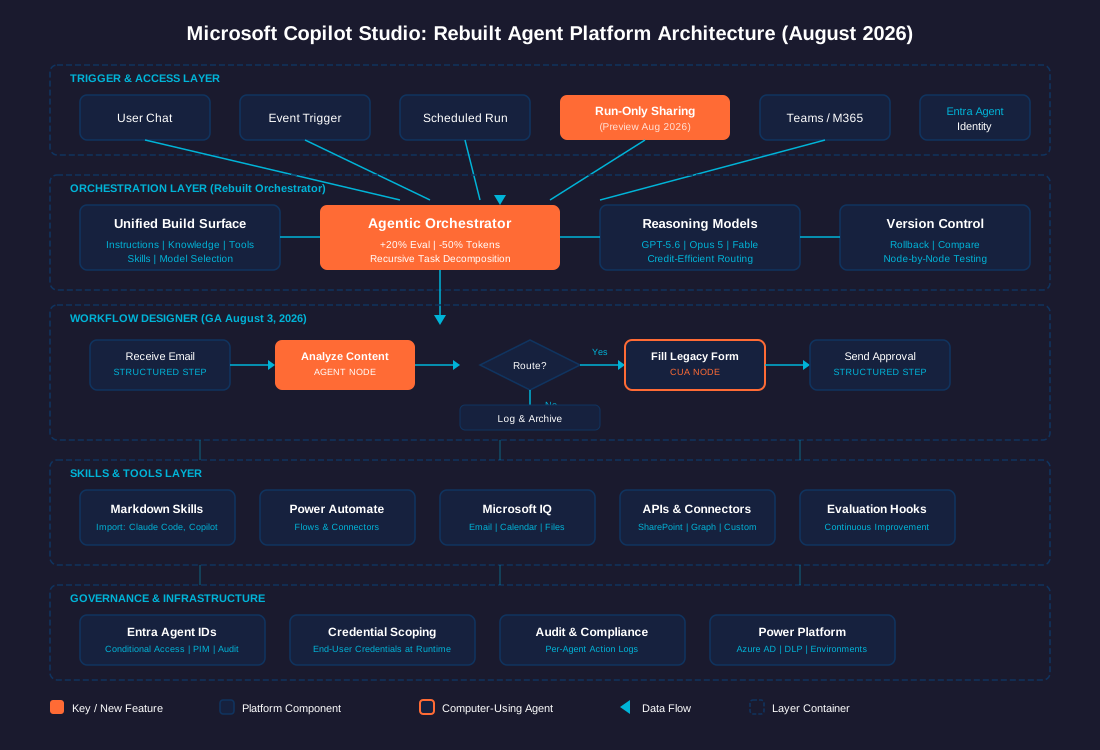
Microsoft’s rebuild throws out the topic-based foundation and replaces it with an agent-first, orchestration-focused architecture. The result, according to Microsoft’s official announcement, is roughly a 20% gain in evaluation performance alongside close to a 50% drop in net token consumption. The gain comes from stronger instruction adherence and the ability to stay on task across recursive, multi-step work without losing context.
For teams currently running RPA workflows transitioning to agentic AI, this is the clearest signal yet that Microsoft is serious about competing with platforms like UiPath Maestro, Salesforce Agentforce, and open-source frameworks like LangGraph for the enterprise agent orchestration layer.
The Rebuilt Orchestrator: Under the Hood
The core of the August 2026 update is a completely new agentic orchestrator underneath every Copilot Studio agent. This is not a feature toggle — it is a ground-up replacement of the runtime that powers agent reasoning, planning, and execution.
Performance Numbers
Microsoft reports two headline metrics from internal evaluations:
| Metric | Improvement | Source |
|---|---|---|
| Evaluation performance (task completion) | ~20% improvement | Microsoft Tech Community |
| Net token consumption | ~50% reduction | Microsoft Tech Community |
These numbers matter because enterprise agent deployments live or die on two things: reliability (does the agent actually complete the task?) and cost (how much compute does each run consume?). A 20% reliability improvement with half the token cost changes the economics of running agent fleets at scale.
Recursive Task Execution
The new orchestrator supports recursive task decomposition: agents can break down complex work into sub-tasks, execute them, and integrate the results without the developer hand-wiring every branch. In the old platform, anything beyond linear conversation flows required manual branching logic that became unmaintainable at scale. The rebuilt orchestrator handles multi-step, non-linear planning natively.
Advanced Reasoning Model Support
Copilot Studio now supports advanced reasoning models — including Opus 5, Fable, and GPT-5.6 — running in a dedicated environment. The platform applies heavy compute only where it adds value (complex planning and reasoning steps) and uses lighter models for deterministic execution steps. This credit-efficient orchestration model means organizations are not paying frontier-model prices for every API call in a workflow.
Backward Compatibility
Existing agents and topics continue to work without modification. Microsoft built backward compatibility into the rebuild — the new architecture is opt-forward for new work, not a forced migration. There is no announced timeline for deprecating the old topic-based model.
Workflow Designer: GA as of August 3, 2026
The Workflow Designer is the headline feature of the August update. It reached general availability on August 3, 2026, replacing the old flow-only designer with a unified visual canvas where you can mix structured workflow steps with agent nodes.
What the Designer Does
Instead of stitching together disconnected tools and logic across multiple surfaces, makers compose intelligent automations on a single visual canvas:
- Structured workflow steps — deterministic actions: call an API, read a SharePoint list, send an email, run an approval loop
- Agent nodes — call an existing Copilot Studio agent directly inside the workflow, letting it reason about a step rather than following hard-coded logic
- Computer-using agent nodes — embed browser or desktop automation agents as workflow steps (more on this below)
This eliminates the old forced choice between fully structured (Power Automate-style) and fully agentic (chat-first Copilot Studio). You keep the predictable parts predictable — “always send this approval email when condition X is met” — and let the agent handle judgment calls: “draft the email body based on these context documents.”
Node-by-Node Testing
Previously, testing a workflow meant running the entire flow end-to-end and reading logs. The new designer supports stepping through individual nodes, inspecting inputs, outputs, and agent reasoning at each step. For anyone who has debugged a 15-step Power Automate flow by reading run history JSON, this is a significant quality-of-life improvement.
Native Versioning
Workflows have native version history. You can roll back to a prior state, compare versions, and publish a specific version to production without overwriting the development branch. This is table stakes for production-grade automation platforms but was missing from Copilot Studio until now.
Why Agent Nodes Are the Real Story
Agent nodes are the feature that separates Copilot Studio’s Workflow Designer from a standard automation designer. When you embed an agent node inside a workflow, you are not calling a function — you are delegating a reasoning task to an LLM-backed agent that can plan, tool-call, and iterate within the scope of that workflow step.
Practical example: an invoice processing workflow might have deterministic steps for receiving the email, extracting attachments, and logging metadata. But the step that reads the invoice, matches it against PO data, and decides whether to flag discrepancies — that step is an agent node. The agent reasons over unstructured input (the invoice PDF) and produces a structured decision, all within the governed workflow.
For teams building enterprise agent control planes, this is exactly the kind of hybrid deterministic-agentic pattern that production systems need.
Computer-Using Agents in Workflows
Computer-using agents (CUA) reached general availability in Copilot Studio in May 2026. The August update takes this further by letting organizations embed CUA directly into multi-step workflows as agent nodes.
What this means in practice: a workflow step can now launch a browser automation agent that navigates a legacy web application, fills forms, extracts data, and passes results to the next workflow step — all without an API integration. This is the same pattern RPA practitioners know from UiPath, Automation Anywhere, and Blue Prism, but embedded inside an agentic workflow rather than running as a standalone bot.
The combination of API-based actions, approval steps, business logic, and adaptive UI interactions in a single workflow closes the gap between traditional RPA and agentic AI. For organizations running hybrid environments with both modern APIs and legacy green-screen applications, this is a significant convergence point.
Run-Only Agent Sharing: Preview August 2026
Run-only agent sharing entered public preview in August 2026, with general availability targeted for January 2027. This feature addresses what Windows Forum analysis calls “one of the most consequential barriers to enterprise adoption of autonomous agents.”
The Problem It Solves
Previously, autonomous agents in Copilot Studio could only be used by makers — the people who built them. Sharing an agent with a business user required giving them edit-level access to Copilot Studio, which created both security risks and licensing overhead. This effectively locked autonomous agents inside the IT department.
How Run-Only Sharing Works
Run-only sharing enables makers to securely share autonomous agents with end users. The end user can trigger the agent, monitor its execution, and receive its output — but cannot view or modify the agent’s instructions, knowledge sources, tools, or workflow logic. The separation between builder and consumer is preserved.
Key capabilities of run-only sharing:
- Event-driven triggers — agents can be triggered by external events (new email, form submission, data change) and run on behalf of the end user using their credentials
- Background execution — agents operate without requiring the user to keep a chat window open
- Credential scoping — agents run using end-user credentials, ensuring data access follows existing permission boundaries
- Audit trail — all agent actions are logged under the end user’s identity for compliance and troubleshooting
Why This Changes Enterprise Adoption
For organizations that have built autonomous agents but struggled to distribute them beyond the development team, run-only sharing is the deployment mechanism they have been waiting for. It converts autonomous agents from developer tools into business-user tools — the same shift that Power Automate enabled for traditional workflows years ago.
This also aligns with the broader industry trend toward governed agent deployment, where the failure mode is not building the agent but deploying it safely at scale across the organization.
Skills: Reusable Markdown Instructions
Skills are a new authoring primitive in the rebuilt Copilot Studio: plain-markdown instruction sets that you write once and load into any agent on demand.
A skill is scoped to a specific task — summarizing emails, drafting a status report, formatting output in a specific template — and it loads at runtime when the agent needs it rather than bloating the system prompt at all times. This addresses a real pain point: as agents accumulate capabilities, their system prompts grow until they hit context window limits and performance degrades.
Cross-Platform Skill Import
The most notable aspect of Skills is cross-platform portability. Microsoft’s implementation explicitly supports importing skills from GitHub Copilot and Claude Code. If you have already written and tested skills in Cursor, Claude Code, or Copilot’s coding environment, you can bring those into Copilot Studio agents without rewriting them.
This is the first clear mechanism for reusing AI-native skill work across platforms. For teams that maintain skills across multiple agent platforms — a common reality in enterprises running both developer tools (Claude Code, Cursor) and business automation tools (Copilot Studio, Power Platform) — this portability eliminates duplicate maintenance.
For practitioners familiar with MCP (Model Context Protocol) and its role in agent interoperability, Skills represent a complementary approach: where MCP standardizes tool calling across agents, Skills standardize instruction reuse across authoring platforms.
Entra Agent Identities: Preview
Copilot Studio agents can now be issued Entra agent identities — real, managed identities in Azure Active Directory — rather than running under a generic service account. This feature entered preview on July 7, 2026.
What Entra agent identities enable:
- Agents appear in your Entra tenant’s identity inventory as first-class entities
- You can apply conditional access policies, Privileged Identity Management (PIM), and role assignments to agent identities
- Audit logs tie actions to a specific agent identity rather than a shared service principal
- Security teams can manage agent access using the same tools they use for human identities
This is a governance feature, not a builder feature. But for organizations scaling from a handful of pilot agents to fleet-level deployment, agent identities are the infrastructure that makes centralized access control possible. Without them, every agent runs under a service account that is hard to audit, hard to scope, and easy to over-permission.
The shift toward treating AI agents as first-class identities in enterprise identity systems is an industry-wide trend. Microsoft is not the only platform doing this — Salesforce’s Agentforce and UiPath’s Orchestrator both have equivalent concepts — but Entra’s deep integration with the Microsoft 365 ecosystem gives it unique leverage in shops that are already Microsoft-centric.
The Simplified Build Surface: Nine Tabs to Four
The rebuilt Copilot Studio consolidates the agent configuration UI from nine tabs to four. Everything related to agent behavior — instructions, knowledge, tools, skills, and model selection — now lives on a single Build surface.
This matters more than it sounds. In the old platform, a maker building a production agent had to navigate across separate areas to connect knowledge sources, configure tools, select models, and set up triggers. The unified Build surface makes the entire agent definition readable at a glance and reviewable as a unit — which directly improves code review, handoff between team members, and audit processes.
Microsoft IQ Integration: Agents That Know Your Organization
The rebuilt Copilot Studio integrates with Microsoft IQ, giving agents access to organizational context: email, calendar, files, Teams conversations, and enterprise data through Microsoft Graph. Agents can make informed decisions based on who is involved, what documents exist, and what meetings are scheduled — without the builder having to manually pipe each data source.
This is the enterprise data advantage Microsoft has over standalone agent platforms. An agent built in Copilot Studio can natively access the same data that a human employee sees in Outlook, Teams, and SharePoint, subject to the same permission boundaries enforced by Entra.
What This Means for RPA Professionals
If you are an RPA developer, solution architect, or automation consultant, the Copilot Studio rebuild has three practical implications:
1. The Lines Between RPA and Agentic AI Are Dissolving
Computer-using agents embedded inside orchestrated workflows is exactly what RPA does — but with LLM-backed reasoning at the decision points instead of rule-based logic. If you understand multi-agent frameworks and traditional RPA patterns, you are well-positioned to build hybrid automations in Copilot Studio.
2. Skills Portability Reduces Vendor Lock-In
The ability to import skills from Claude Code and GitHub Copilot means your agent logic is not trapped inside one vendor’s platform. Build skills as portable markdown once, deploy them across Copilot Studio, Claude Code, and other skill-aware platforms. This is a meaningful step toward the kind of agent interoperability that MCP aims to enable at the tool-calling layer.
3. Governance Is Now a First-Class Concern
Entra agent identities, run-only sharing with credential scoping, and version-controlled workflows signal that Microsoft is building for the agent governance requirements that enterprises demand before scaling past pilot phase. If your organization is evaluating Copilot Studio for production agent deployment, these governance features are the checklist items to verify.
Migration Path: What Existing Copilot Studio Users Should Do
Microsoft has been clear about the migration path:
| Scenario | Action Required |
|---|---|
| New agents created after July 7, 2026 | Automatically use the rebuilt orchestrator and Build surface |
| Existing agents and topics | No immediate action — they continue to function on the old runtime |
| Existing Power Automate flows with AI Builder steps | Evaluate the Workflow Designer as an alternative — agent nodes can replace AI Builder calls with more configurable, visible reasoning |
| Skills from Claude Code or GitHub Copilot | Test the import path — cross-platform skill portability is new and worth validating |
| Organizations with strict identity governance | Enroll in the Entra agent identities preview now — retrofitting access controls after production rollout is always more expensive |
There is no forced migration timeline. But the rebuild is clearly the future path — new features will land on the rebuilt platform, not the legacy topic-based one. Teams should plan to evaluate the Workflow Designer for their next new automation project rather than continuing to build on the old surface.
How Copilot Studio Compares to Other Agent Platforms
The August 2026 updates position Copilot Studio in direct competition with several major agent orchestration platforms:
| Capability | Microsoft Copilot Studio | Salesforce Agentforce | UiPath Maestro | LangGraph (OSS) |
|---|---|---|---|---|
| Multi-agent orchestration | Agent nodes in workflows | Atlas 3.0 routing + A2A protocol | Flow + BPMN orchestration | Graph-based state machines |
| Computer-using agents | CUA nodes in workflows (GA) | Not natively supported | Full RPA runtime | Via browser-use / custom tools |
| Enterprise identity | Entra agent identities (preview) | Salesforce identity | Orchestrator robot accounts | Custom implementation |
| Skill portability | Import from Claude Code / GitHub Copilot | Agentforce-only | UiPath Solution packages | Python modules |
| No-code builder | Visual Workflow Designer (GA) | Agent Builder (GA) | Studio Web / Flow Designer | LangGraph Studio |
| Run-only sharing | Preview Aug 2026 | Agentforce Self-Service (GA) | Attended/unattended licensing | Custom deployment |
Each platform has different strengths. Copilot Studio’s advantage is deep Microsoft 365 integration — native access to Outlook, Teams, SharePoint, and the Microsoft Graph — combined with the new Workflow Designer that bridges traditional automation and agentic AI. Its weakness relative to UiPath is less mature desktop automation (CUA is newer than UiPath’s decades of RPA runtime), and relative to LangGraph it offers less fine-grained control over agent reasoning loops.
Frequently Asked Questions
Do I need to migrate my existing Copilot Studio agents to the new platform?
No. Existing agents and topics continue to work on the legacy runtime. There is no announced forced migration timeline. However, new features will land on the rebuilt platform, so plan to use the new Workflow Designer for your next new project.
Is the Copilot Studio Workflow Designer a replacement for Power Automate?
Not exactly. Power Automate remains the platform for pure rule-based automation. The Workflow Designer is designed for hybrid workflows that combine deterministic steps with agent-backed reasoning steps. If your workflow needs LLM reasoning at decision points, use the Workflow Designer. If it is purely deterministic, Power Automate is still the right tool.
Can I use Copilot Studio agents for desktop automation like RPA?
Yes. Computer-using agents (CUA) reached GA in May 2026 and can now be embedded as nodes inside Workflow Designer flows. CUA can navigate browsers and desktop applications, fill forms, and extract data — similar to traditional RPA bots but with LLM-backed adaptability.
What models does the rebuilt Copilot Studio support?
The rebuilt platform supports multiple models including GPT-5.6, Opus 5, and Fable. Model selection is a configuration option per agent — the platform applies advanced reasoning models where complex planning is needed and lighter models for deterministic steps to optimize cost.
When will run-only agent sharing be generally available?
Run-only sharing entered public preview in August 2026. Microsoft targets general availability for January 2027.
Key Takeaways
- Ground-up rebuild, not incremental update — Copilot Studio’s orchestration engine, UI, and authoring model have all been replaced. The old topic-based conversation model is being superseded by an agent-first architecture.
- Workflow Designer is GA — as of August 3, 2026, you can build hybrid workflows mixing deterministic steps with agent reasoning nodes on a visual canvas with node-by-node testing and native versioning.
- 20% better, 50% cheaper — the rebuilt orchestrator delivers roughly 20% improved task completion with close to 50% reduction in token consumption.
- Run-only sharing unlocks enterprise deployment — for the first time, autonomous agents can be distributed to business users without giving them maker-level access (preview August 2026, GA January 2027).
- Computer-using agents in workflows — CUA embedded as workflow nodes bridges the gap between traditional RPA and agentic AI in a single platform.
- Cross-platform skill portability — skills from Claude Code and GitHub Copilot can be imported into Copilot Studio agents, reducing vendor lock-in.
- Entra agent identities — agents become first-class identities in Azure AD, enabling enterprise-grade access control, auditing, and compliance.
- No forced migration — existing agents keep working. But the rebuild is clearly the future; plan new projects on the new platform.
References
- Meet the new Copilot Studio: rebuilt for more complex, multi-step work — Microsoft Tech Community (June 2026)
- What’s new in Copilot Studio: May 2026 updates and features — Microsoft Copilot Blog
- Copilot Studio Run-Only Agent Sharing Previews August 2026 — Windows Forum
- Microsoft Rebuilt Copilot Studio’s Engine: Builder’s Guide — ChatForest (July 2026)
- Microsoft Unveils Redesigned Copilot Studio for Complex AI Agent Workflows — RedmondMag (June 2026)
- Copilot Studio: Agent & Workflow Update — HubSite 365 (August 2026)
- Microsoft Copilot Studio: Share Autonomous Agents to End Users (Run-Only) — M365 Admin
- Design autonomous agent capabilities — Microsoft Copilot Studio | Microsoft Learn
- Microsoft Copilot Studio Gets New Drag-and-Drop AI Workflow Designer — WinCentral
- More powerful agents and workflows for autonomous business processes — Microsoft Tech Community