


Five months after its first commit on March 17, 2026, stablyai/orca crossed 43,000 GitHub stars, topped GitHub Trending for consecutive weeks, and introduced a term the industry is still absorbing: Agent Development Environment (ADE). The concept is deceptively simple — run Claude Code, Codex, Gemini CLI, and any other terminal-based coding agent side by side, each pinned to its own isolated Git worktree, tracked and reviewed in one window. In practice, it represents a paradigm shift as significant for AI-assisted development as the original IDE was for manual coding.
- What Is Orca ADE?
- Why Orca Matters: The Shift from Sequential to Parallel Agent Work
- Architecture Deep-Dive: How Orca Actually Works
- Process Architecture
- Git Worktree Isolation — The Core Innovation
- Terminal Layer: Ghostty-Class WebGL Rendering
- Supported Agents: 30+ CLI Agents and Counting
- Key Features That Set Orca Apart
- 1. Parallel Worktrees with Competitive Evaluation
- 2. Mobile Companion App
- 3. Design Mode
- 4. Annotated AI Diffs
- 5. SSH Remote Worktrees
- 6. GitHub and Linear Integration
- 7. Orca CLI
- 8. Computer Use
- Getting Started: Installation and First Run
- Step 1: Download and Install
- Step 2: Open a Repository
- Step 3: Create Your First Parallel Session
- Step 4: Fan a Prompt
- Step 5: Review, Annotate, Merge
- Production Considerations
- Orca vs. the Alternatives: Where It Fits in the 2026 Landscape
- The RPA Connection: Why Automation Teams Should Care
- The Orchestration Pattern Is Identical
- RPA Teams Are Already Writing More Code
- The Agent Sprawl Problem
- Computer Use Bridges RPA and Coding Agents
- Limitations and What to Watch
- Frequently Asked Questions
- Is Orca ADE free?
- Does Orca ADE proxy my agent traffic through its servers?
- Can I use Orca with UiPath coded workflows or Power Automate scripts?
- How does Orca compare to multi-agent frameworks like CrewAI or LangGraph?
- What is an Agent Development Environment (ADE)?
- Key Takeaways
- References
If you build automations for a living — whether in UiPath Studio, Power Automate, or Python-based agent frameworks — the implications of Orca’s architecture deserve your attention. The same orchestration principles that make RPA Orchestrator indispensable for managing bot fleets now apply to managing fleets of AI coding agents. This guide breaks down what Orca ADE actually does, how its architecture works under the hood, how to set it up, and why agentic AI architects should be watching this space closely.
What Is Orca ADE?
Orca is a free, MIT-licensed desktop application built by Stably AI, a Y Combinator Winter 2022 company founded by Jinjing Liang (who previously built the testing and release infrastructure that ships Google Chrome to billions of users) and Neil Parker (one of Uber’s youngest Tech Leads, who led multiple large-scale ML projects on Uber’s Safety team). The founding team includes PhD graduates specializing in AI’s application in software reliability plus ex-founders who have previously built and sold an AI startup.
At its core, Orca is an Agent Development Environment — a new category of tooling that sits above individual AI coding agents and below your project management workflow. Think of it as the control plane for your agent fleet. Instead of the sequential prompt → wait → review → prompt loop that defines working with a single coding agent, Orca lets you fan one prompt across five agents simultaneously, each operating in its own isolated Git worktree, then compare the results and merge the winner.
The “ADE” framing is deliberate. Just as IDEs (Integrated Development Environments) unified editing, compiling, and debugging into one interface in the 1990s, Orca argues that the 2026 developer workflow needs a unified environment for orchestrating, reviewing, and managing the output of multiple AI coding agents. The project describes itself as built “for 100x builders” — engineers who run 10 to 100 coding agents at once.
Why Orca Matters: The Shift from Sequential to Parallel Agent Work
To understand why Orca crossed 43,000 stars in five months, you need to understand the problem it solves.
By mid-2026, the AI coding agent market has exploded. Claude Code, OpenAI Codex, Google’s Antigravity, Cursor CLI, GitHub Copilot CLI, Devin, Cline, and dozens more all compete for developer attention. A McKinsey research report found that nearly one-third of surveyed organizations had decided against purchasing at least one software product because they could build the functionality internally using AI-powered coding agents. Gartner predicts that 40% of enterprise applications will feature task-specific AI agents by end of 2026, up from less than 5% in 2025.
But here is the bottleneck: most developers use these agents one at a time, in a sequential loop. You prompt Claude Code, wait for it to finish, review the output, then prompt again. If you want to try a different agent on the same task — say, comparing Codex’s approach to Claude Code’s — you need to switch tools, contexts, and often branches manually. Scale this across a team of five developers, each running agents on different features, and the coordination overhead becomes the new bottleneck.


Orca eliminates this bottleneck through three architectural decisions:
- Git worktree isolation — every agent session gets its own genuine
git checkoutin a separate worktree. Agents cannot overwrite each other’s work mid-task. There is zero shared mutable state between concurrent sessions. - Agent-agnostic orchestration — Orca does not wrap, proxy, or modify agent traffic. If a tool runs in a terminal, it runs in Orca. Your existing Claude Code or Codex subscriptions work unchanged; Orca just runs them in parallel.
- Unified review surface — annotated diffs, inline comments, and branch comparison happen in one window, so the human reviewer (still essential) can evaluate multiple agent outputs without context-switching between tools.
This is not incremental improvement. It is a categorical change in how software gets built — from one-human-one-agent to one-human-many-agents. The RPA-to-agentic-AI transition that many teams are navigating involves exactly this kind of paradigm shift.
Architecture Deep-Dive: How Orca Actually Works
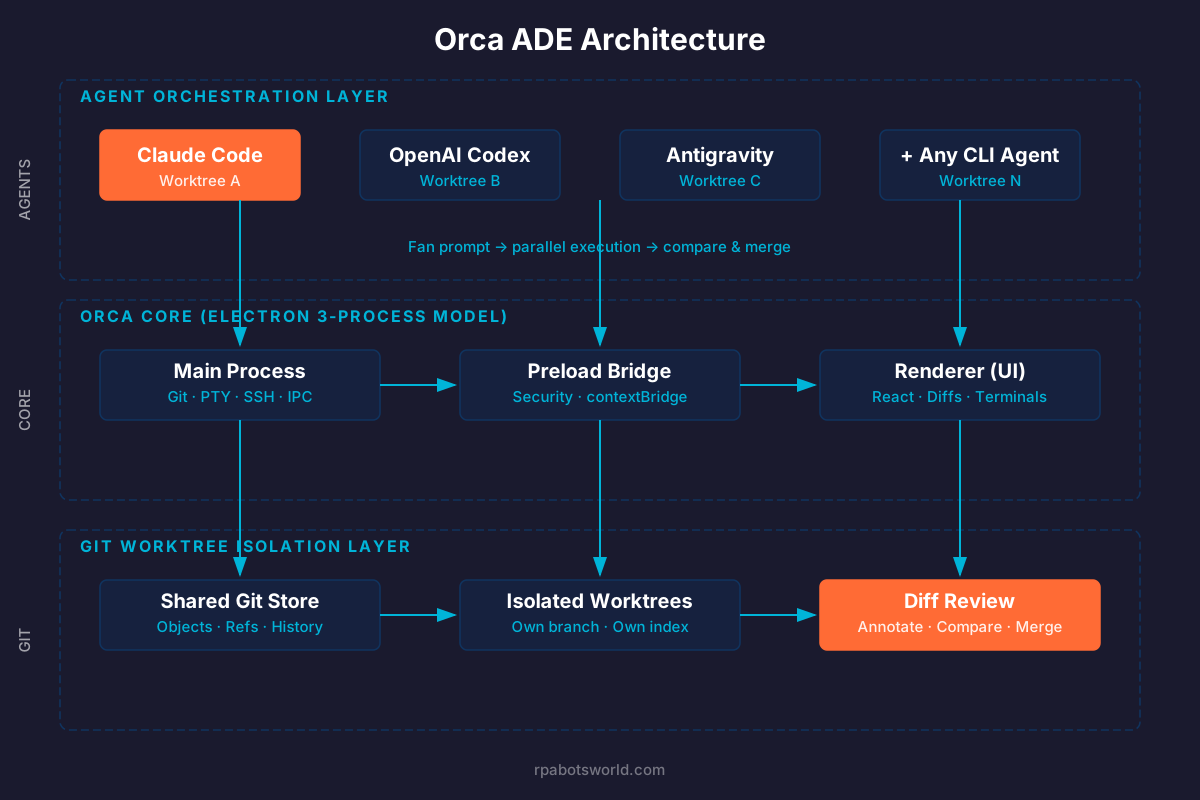
Orca employs a three-process Electron architecture — Main, Preload, and Renderer — to separate system-level operations from the UI and maintain responsiveness while handling heavy background tasks.
Process Architecture
The Main process handles all system-level operations: Git operations (clone, checkout, worktree creation), PTY (pseudo-terminal) session management for running agent CLIs, SSH tunnel establishment and maintenance, file system watchers, and IPC (inter-process communication) with the renderer. It runs on Node.js and has full access to native APIs.
The Preload process acts as a security bridge between Main and Renderer. It exposes a carefully scoped API surface to the renderer via Electron’s contextBridge, preventing the UI from directly accessing system resources — a security design pattern that matters when you are running untrusted agent output.
The Renderer process runs the UI, built with React and TypeScript. It handles the workspace layout (terminal splits, editor panes, diff viewers, browser previews), state management for active worktree sessions, and the visual diff annotation system.
Git Worktree Isolation — The Core Innovation
The heart of Orca’s architecture is its use of Git worktrees. A Git worktree is a linked working tree attached to a repository that lets you check out a different branch without cloning the entire repo. Orca creates one worktree per agent session, each on its own branch, checked out from the same base ref.
This means:
- Agent A (Claude Code) works on
feature-auth-claudein/worktrees/auth-claude/ - Agent B (Codex) works on
feature-auth-codexin/worktrees/auth-codex/ - Agent C (Gemini) works on
feature-auth-geminiin/worktrees/auth-gemini/
All three share the same Git object store (so history and refs are shared), but each has its own working directory and index. There is no file-level contention. No merge conflicts mid-task. No race conditions on .git/index. This is filesystem-level concurrency, not application-level locking.
For RPA practitioners familiar with UiPath Orchestrator’s queue-based job isolation — where each robot gets its own transaction and its own process execution context — the parallel is striking. Orca achieves for coding agents what Orchestrator achieves for RPA robots: deterministic isolation with centralized review.
Terminal Layer: Ghostty-Class WebGL Rendering
Each agent runs inside a PTY session rendered through a WebGL-accelerated terminal emulator. Orca’s terminal layer supports infinite splits (arrange agents, terminals, browsers, diffs, and files into split panes that match the shape of the task), persistent scrollback that survives application restarts, and session restoration on crash or reconnect. The rendering performance matters because coding agents produce substantial terminal output — watching five agents work simultaneously requires a terminal layer that does not bottleneck on rendering.
Supported Agents: 30+ CLI Agents and Counting
Orca’s agent-agnostic design means it works with any CLI agent. As of September 2026, the officially tested list includes over 30 agents:
| Category | Agents |
|---|---|
| Tier 1 (most popular) | Claude Code, OpenAI Codex, Cursor CLI, GitHub Copilot CLI |
| Major vendors | Antigravity (Google), Pi, Grok (xAI), Kiro (AWS), Devin, Kimi (Moonshot) |
| Open source | OpenCode, OpenClaude, Hermes Agent (Nous Research), Goose (Block), Cline |
| Specialized | Amp, Auggie, Autohand Code, Codebuff, Command Code, Continue, Droid (Factory), Kilocode, MiMo Code (Xiaomi), Mistral Vibe, Qwen Code, Rovo Dev (Atlassian) |
| Meta-orchestrators | oh-my-pi (Pi wrapper) |
The key architectural point: Orca does not proxy agent traffic through its own servers. Your API keys, subscriptions, and agent sessions remain between you and the agent provider. Orca is a local orchestration and review layer, not a middleman. This is a deliberate privacy and security decision — and one that enterprise teams evaluating the tool will appreciate.
Key Features That Set Orca Apart
1. Parallel Worktrees with Competitive Evaluation
Fan one prompt across multiple agents, each in its own isolated Git worktree. When all agents complete, compare their diffs side by side. Merge the winner. This is not theoretical — it is the primary workflow Orca was built around. For complex implementation tasks where the “right” approach is uncertain, running three agents in parallel and picking the best result is faster than running one agent, reviewing, deciding it is suboptimal, and starting over.
2. Mobile Companion App
Monitor and steer agents from your phone. Get notified when an agent finishes and send follow-ups from anywhere. Available on iOS (App Store and TestFlight) and Android (APK). For team leads managing agent workloads across a distributed team, this is a force multiplier — you can review and redirect agent work during commute or between meetings.
3. Design Mode
Click any UI element in a real Chromium window embedded in Orca to send its HTML, CSS, and a cropped screenshot straight into your agent’s prompt. This bridges the gap between visual design intent and code generation — instead of describing a UI element in text, you point at it.
4. Annotated AI Diffs
Drop inline comments on any diff line generated by an agent and ship those comments back to the agent as follow-up instructions. This creates a tight human-in-the-loop review cycle without leaving the tool. Review, edit, and commit without context-switching.
5. SSH Remote Worktrees
Run agents on a remote server with full file editing, Git, and terminal access. Auto-reconnect and port forwarding included. For teams with beefy cloud build machines, this means you can run compute-intensive agent workloads on powerful hardware while controlling them from a lightweight laptop.
6. GitHub and Linear Integration
Browse PRs, issues, and project boards in-app. Open a worktree directly from a task and review without context-switching. This connects agent work to your existing project management workflow.
7. Orca CLI
Agents can drive Orca too. Script every workflow with orca worktree create, snapshot, click, and fill. This enables automation of the agent orchestration itself — a meta-automation layer that will feel familiar to anyone who has written UiPath coded workflows or Power Automate desktop flows to orchestrate other automations.
8. Computer Use
Let agents operate desktop apps and visible UI when a workflow needs real interaction. This is the bridge between terminal-based coding agents and GUI automation — precisely the intersection where RPA meets agentic AI.
Getting Started: Installation and First Run
Step 1: Download and Install
Orca is available for macOS (Apple Silicon and Intel), Windows, and Linux.
# macOS (Homebrew)
brew install --cask stablyai/orca/orca

# Arch Linux (AUR)
yay -S stably-orca-bin

# Or download directly from https://onorca.dev/download
# Windows: .exe installer
# Linux: AppImage
# macOS: .dmg
Step 2: Open a Repository
Launch Orca and open your project repository. Orca will detect the Git configuration and prepare its worktree infrastructure.
Step 3: Create Your First Parallel Session
Create a new worktree from the workspace panel. Select which agent(s) to run — Claude Code, Codex, or any other CLI agent you have installed. Each agent gets its own branch and working directory.
Step 4: Fan a Prompt
Write your prompt once, then fan it across multiple agents. Orca creates isolated worktrees for each, starts the agent sessions, and shows you real-time output in split terminal panes.
Step 5: Review, Annotate, Merge
When agents complete, use the built-in diff viewer to compare outputs. Annotate lines with feedback. Merge the best result back to your main branch.
Production Considerations
- Cost: Orca itself is free. Your real bill is the agent subscriptions and model credits you already pay for. Running five agents in parallel means five times the token consumption. Budget accordingly.
- Disk space: Git worktrees share the object store but each gets its own working tree checkout. Large monorepos will consume proportionally more disk space per concurrent worktree.
- Network: Parallel agent sessions mean parallel API calls. Ensure your network and API rate limits can handle the concurrency.
Orca vs. the Alternatives: Where It Fits in the 2026 Landscape
Orca occupies a distinct niche in the 2026 AI coding tool ecosystem. To understand where it fits, consider the three dominant philosophies:
| Tool | Category | Philosophy | Best For |
|---|---|---|---|
| Cursor | AI IDE | Polished IDE with the best inline autocomplete; model-swapping per task | Routine coding with AI assistance (the 80%) |
| Claude Code / Codex | Terminal Agent | Deep agentic reasoning, end-to-end feature shipping from the terminal | Complex multi-file tasks requiring deep reasoning (the 20%) |
| Windsurf | Agentic IDE | IDE that drives itself — Cascade plans across files, runs commands, maintains context | Product engineers who want fewer prompts, more flow |
| Orca ADE | Agent Orchestrator | Run any/all of the above in parallel, in isolated worktrees, with unified review | Engineers running 5-100 agents simultaneously on complex projects |
The key distinction: Orca does not compete with Claude Code, Codex, or Cursor. It orchestrates them. The most popular developer stack in 2026 — Claude Code + Cursor — works inside Orca. You are not choosing between them; you are adding an orchestration layer on top.
This is analogous to the relationship between an RPA robot and an RPA Orchestrator. The robot (agent) does the work. The orchestrator (Orca) manages the fleet, assigns tasks, isolates execution contexts, and provides the review and merge surface.
The RPA Connection: Why Automation Teams Should Care
If you are reading this on rpabotsworld.com, you likely build automations for a living. Here is why Orca matters to you specifically:
The Orchestration Pattern Is Identical
UiPath Orchestrator manages a fleet of robots. Each robot gets an isolated execution context (its own machine or container). Jobs are assigned, monitored, and their outputs reviewed centrally. Orca does the same thing for coding agents — isolated worktrees instead of isolated VMs, diff review instead of job logs, branch merging instead of queue completion.
If you understand why agentic automation programs fail, you understand why unmanaged agent fleets are equally dangerous. Without orchestration, parallel agents create merge conflicts, duplicate work, inconsistent code styles, and review bottlenecks. Orca’s worktree isolation solves the same class of problems that Orchestrator’s queue-based transaction isolation solves.
RPA Teams Are Already Writing More Code
The transition from low-code RPA (drag-and-drop XAML workflows) to coded automations (C# coded workflows in UiPath, Python-based agents, LangGraph pipelines) means RPA teams are spending more time in code. As the 2026 agentic platform comparison shows, every major RPA vendor is adding agent capabilities, and those capabilities increasingly involve writing and reviewing code. A tool that makes code review of AI-generated output faster and more reliable is directly relevant.
The Agent Sprawl Problem
Enterprise teams that have adopted AI coding agents often face the same “bot sprawl” problem that plagued early RPA programs — too many agents, too little governance, no centralized visibility. Orca provides a single pane of glass for agent activity, which is the first step toward the kind of agent governance frameworks that enterprise IT departments are starting to demand.
Computer Use Bridges RPA and Coding Agents
Orca’s Computer Use feature — letting agents operate desktop apps and visible UI — sits precisely at the intersection of RPA (automate GUI interactions) and coding agents (automate code generation). For hybrid automation workflows that involve both code generation and GUI interaction, this is a natural convergence point.
Limitations and What to Watch
No tool review is complete without an honest assessment of limitations:
- Electron-based: Orca is an Electron app, which means higher memory consumption than native alternatives. Running five concurrent agent terminals with WebGL rendering in an Electron wrapper will consume significant RAM. Teams on memory-constrained machines should monitor resource usage.
- Cost multiplication: Running agents in parallel multiplies your API costs proportionally. Five agents working for 30 minutes each costs the same as one agent working for 150 minutes. The value proposition depends on whether parallel speed is worth the cost.
- Source-available, not fully open governance (yet): While MIT-licensed, the project is still primarily driven by Stably AI. Community governance structures are evolving. Compare this to projects like n8n (which has a mature community contribution model) or LangChain (which has a formal RFC process).
- No built-in agent evaluation: Orca shows you diffs but does not automatically evaluate code quality, run tests on agent output, or score agent performance. The human reviewer remains the quality gate. Future integration with automated testing pipelines would strengthen the platform significantly.
- Early Windows and Linux support: While officially cross-platform, the project’s roots are on macOS. Windows and Linux users should expect a slightly less polished experience in the current version, with rapid improvement expected given the project’s daily ship cadence.
Frequently Asked Questions
Is Orca ADE free?
Yes. Orca itself is completely free and MIT-licensed. There is no subscription, no per-seat pricing, and no premium tier. Your only costs are the AI coding agent subscriptions (Claude Code, Codex, etc.) and model API credits you already pay for. Orca is an orchestration layer, not a model provider.
Does Orca ADE proxy my agent traffic through its servers?
No. Orca runs entirely locally. Your API keys, agent sessions, and code stay on your machine. The only network component is the optional mobile companion relay (for phone notifications), which is also open source and available in the repository’s cloud/ directory if you want to self-host it.
Can I use Orca with UiPath coded workflows or Power Automate scripts?
Yes, if you use CLI-based coding agents to write those workflows. For example, you could run Claude Code in Orca to generate UiPath C# coded workflows, while simultaneously running Codex to generate unit tests for those workflows, each in its own worktree. Orca orchestrates the coding agents; it does not care what language or framework the agents are writing in.
How does Orca compare to multi-agent frameworks like CrewAI or LangGraph?
Different category entirely. CrewAI and LangGraph orchestrate AI agents at the application layer — defining roles, tools, and communication patterns for agents that perform tasks within a running application. Orca orchestrates coding agents at the development layer — managing the environments where agents write code. You might use LangGraph to build a multi-agent system, and use Orca to run the coding agents that write that LangGraph code.
What is an Agent Development Environment (ADE)?
An ADE is a new category of developer tooling that provides a unified environment for running, monitoring, reviewing, and managing the output of multiple AI coding agents. Just as an IDE unified editing, compiling, and debugging in one tool, an ADE unifies agent orchestration, output review, and code merging. Orca coined the term in 2026 and is the leading implementation of the concept.
Key Takeaways
- Orca ADE introduces a new category — the Agent Development Environment — that orchestrates parallel coding agents the way an RPA Orchestrator manages a bot fleet.
- Git worktree isolation is the core architectural innovation: each agent gets its own branch and working directory with zero shared mutable state, enabling true parallel execution without merge conflicts.
- Agent-agnostic by design: Orca works with 30+ CLI agents (Claude Code, Codex, Gemini, Cursor, and more) without proxying traffic or requiring vendor lock-in.
- 43,000+ stars in 5 months signals genuine developer demand for multi-agent orchestration tooling — this is not a niche project.
- Free and MIT-licensed with no per-seat cost. Your bill is your existing agent subscriptions.
- For RPA teams moving into agentic AI: Orca’s orchestration patterns directly mirror the bot-fleet management principles you already know. The paradigm shift is from sequential single-agent work to parallel multi-agent orchestration.
- Watch for: automated agent output evaluation, deeper CI/CD integration, and enterprise governance features as the project matures.
References
- Stably AI. “Orca — The Agent Development Environment.” onorca.dev. Accessed September 2026.
- stablyai/orca GitHub Repository. github.com/stablyai/orca. MIT License. Accessed September 2026.
- Y Combinator. “Stably AI (Orca): We make Orca, MIT open source terminal-based agent orchestrator.” ycombinator.com. Accessed September 2026.
- AgentConn. “Orca Built an IDE for Agent Fleets. Is the ADE Real?” agentconn.com. 2026.
- CoddyKit Blog. “Orca: The Open-Source ADE With 43,000+ GitHub Stars That Orchestrates Your AI Coding Agents in Parallel.” coddykit.com. 2026.
- Yeyupiaoling. “Orca: An ADE Running Five Coding Agents Simultaneously, A New Parallel Orchestration Paradigm.” blog.yeyupiaoling.cn. 2026.
- McKinsey & Company. Research on AI coding agents’ impact on enterprise software purchasing decisions. Referenced via multiple industry sources, 2026.
- Gartner. Prediction: 40% of enterprise applications will feature task-specific AI agents by end of 2026. Referenced via Firecrawl.
- DeepWiki. “stablyai/orca — Architecture and Technical Documentation.” deepwiki.com. 2026.
- Vibecodinghub. “Orca Review: MIT-licensed agent development environment.” vibecodinghub.org. 2026.


